Launch offer — valid today only

📄 Digital book in PDF · read it on your phone or print it

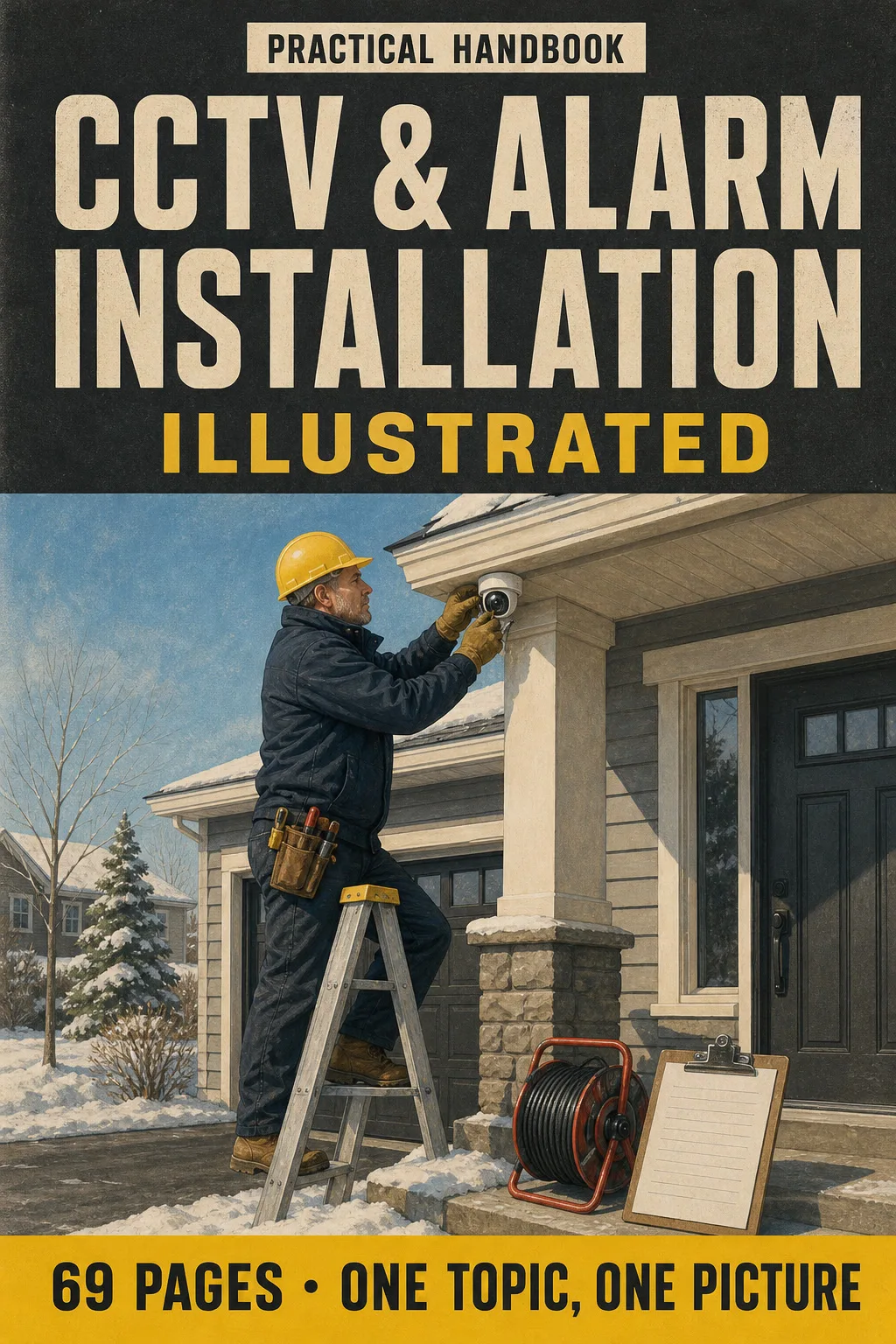
Security Alarms and CCTV, Illustrated: For Installers in Canada Every Install in the Same Order

Zone planning, PIR placement, end-of-line resistors, PoE power budgets, pixels per metre, storage days, cold-weather housings and fault-finding. Written for Canada, in metric. Every topic has its own page: the drawing first, then what you need to remember. 69 illustrated pages.

SEND ME THE 69 ILLUSTRATED PAGES

🔒 Secure checkout · PDF by email · 30-day guarantee

Every topic, its own pageEach zone, detector, camera and fault drawn, with the explanation beside it
69 illustrated pages9 parts, from the system at a glance to the numbers to keep in the van
Up-to-date sourcesCanadian Electrical Code Part I, CAN/ULC-S302 and manufacturer installation data
PDF by emailFormat

Look Inside the Book

Every page has one big drawing and a box with the numbers and steps you need on site:

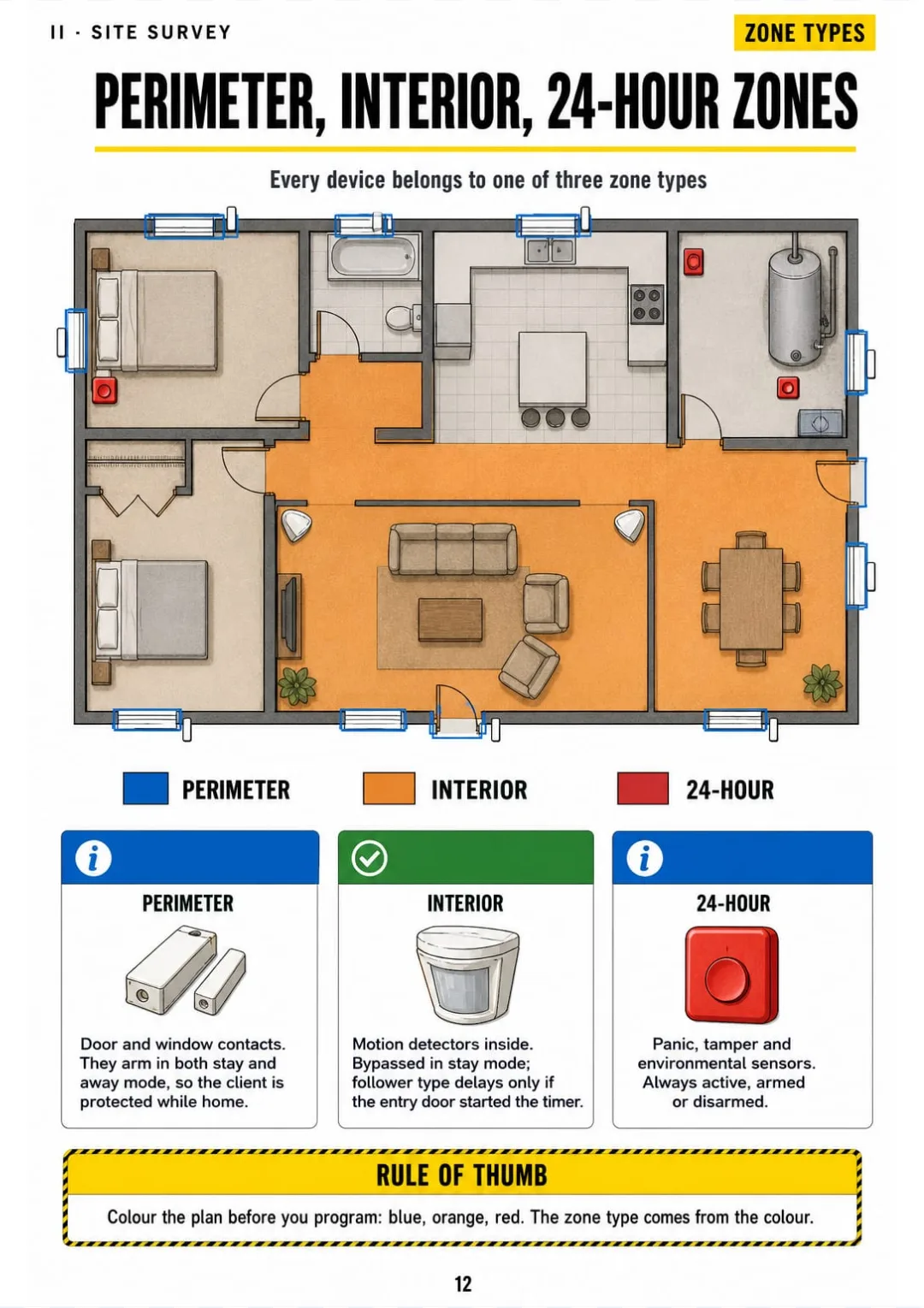
Contacts are perimeter, motion is interior, panic, tamper and water are 24-hour
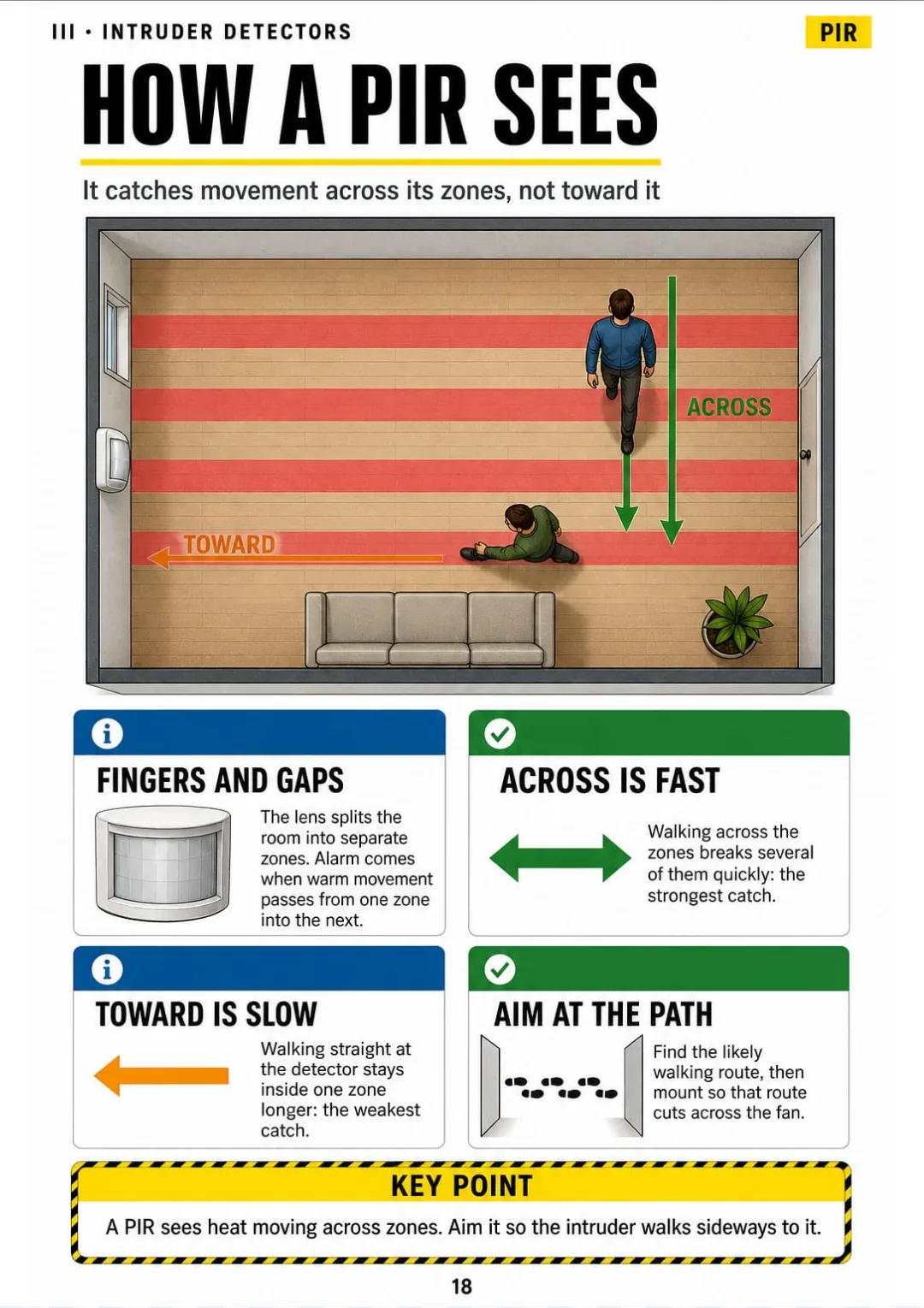
The PIR fan pattern drawn from above: why you aim across the walking path
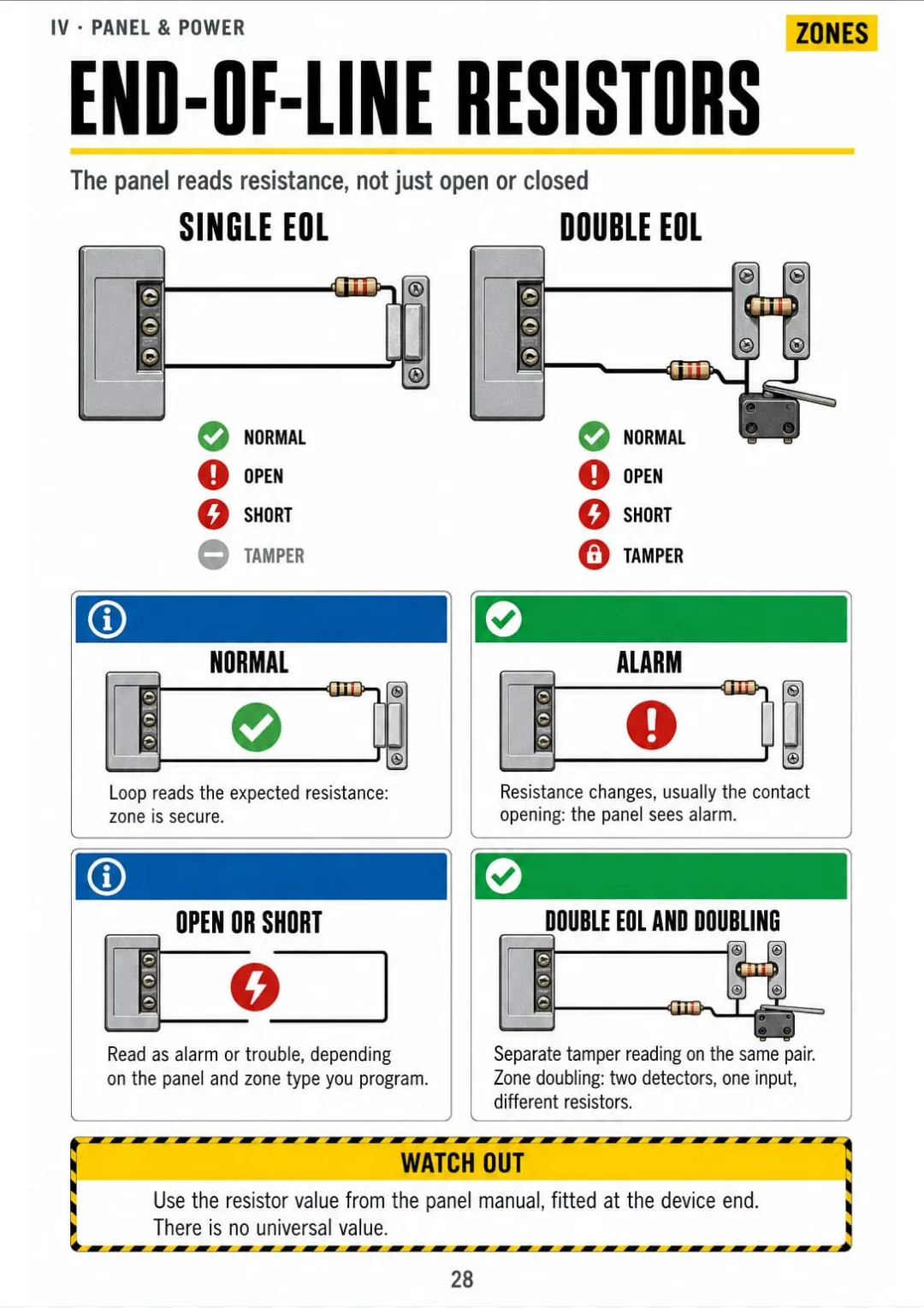
Single EOL vs double EOL: normal, open, short and tamper side by side.
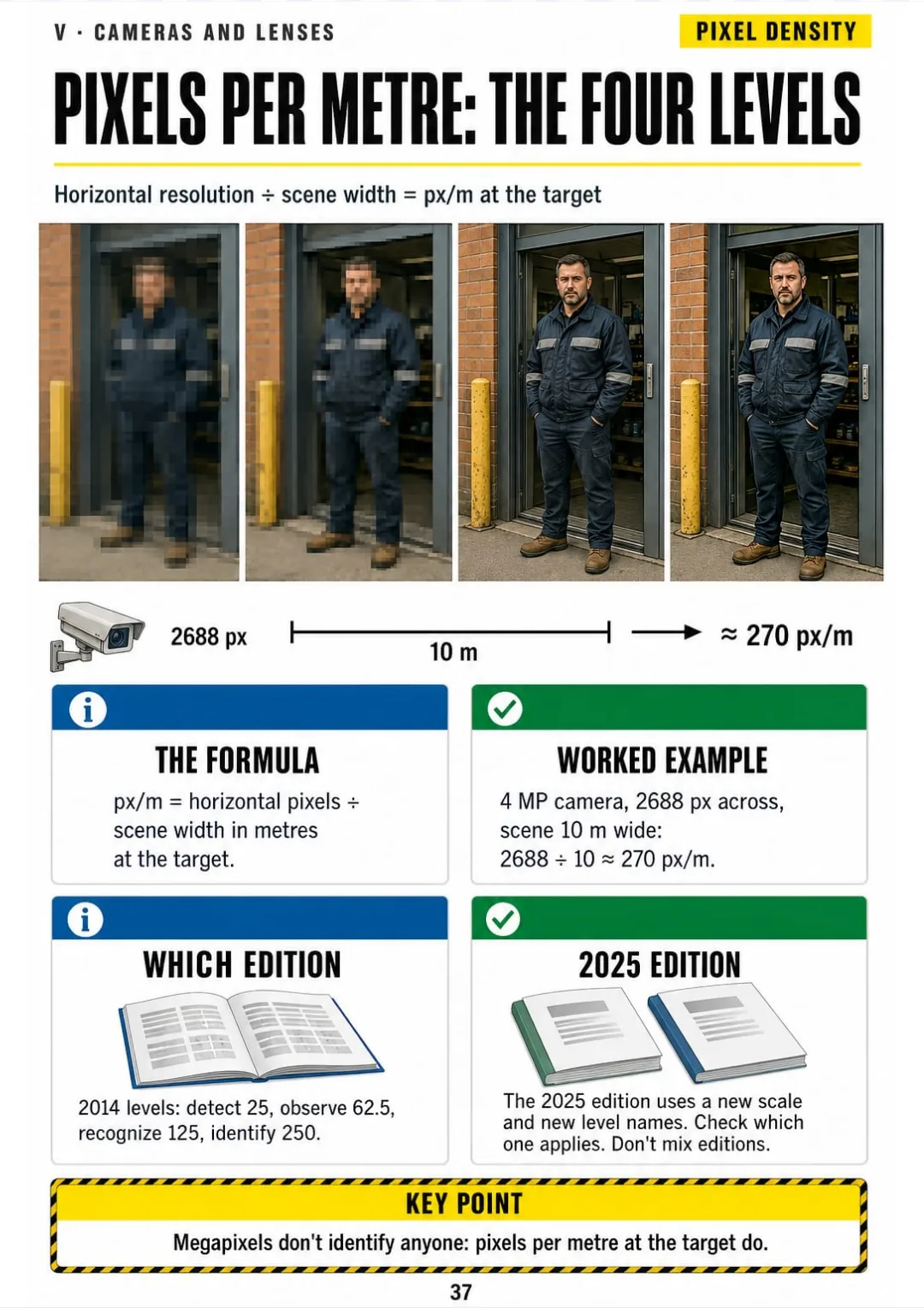
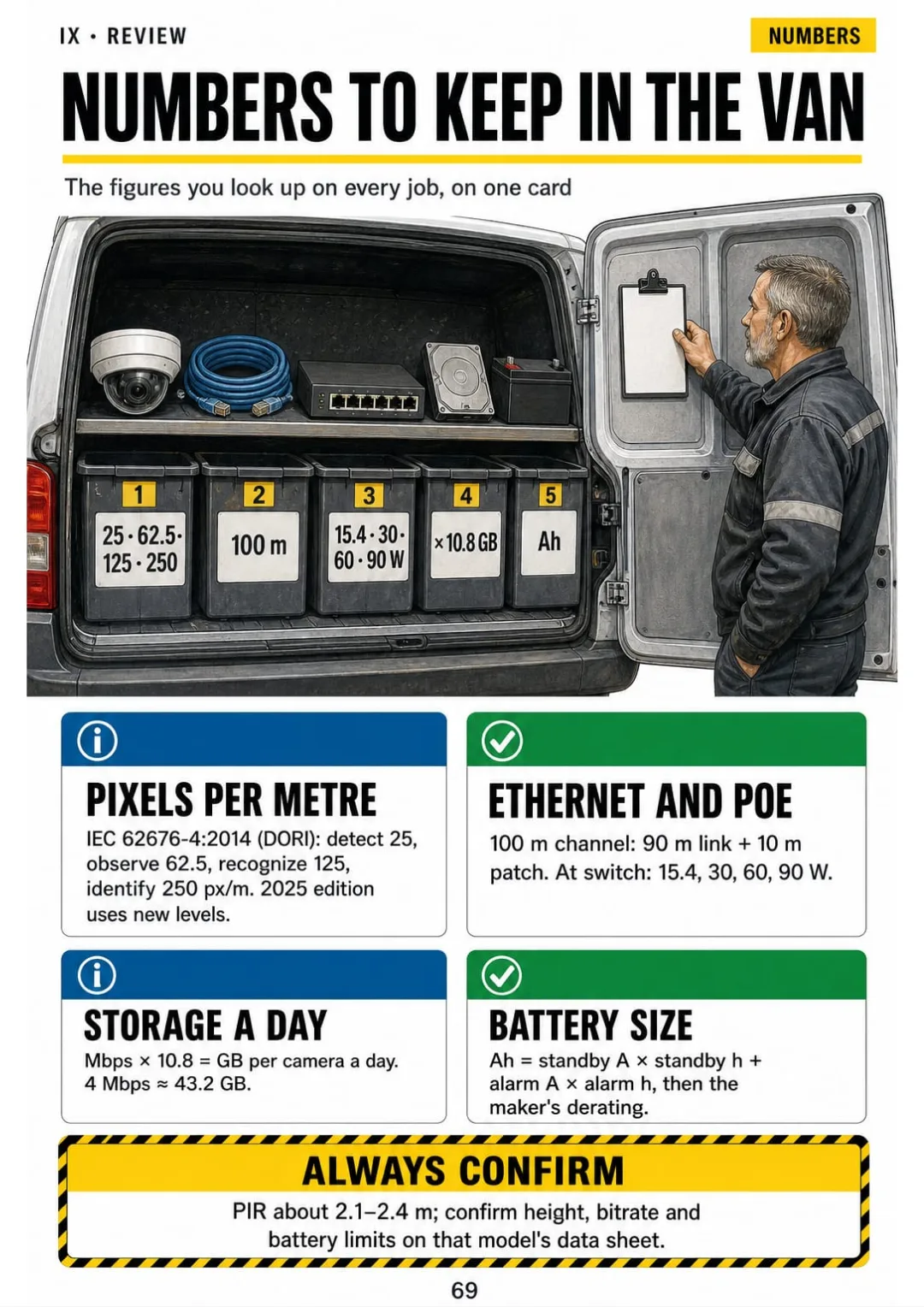
Detect 25, observe 62.5, recognise 125, identify 250 px/m: 4 MP over 10 m ≈ 270
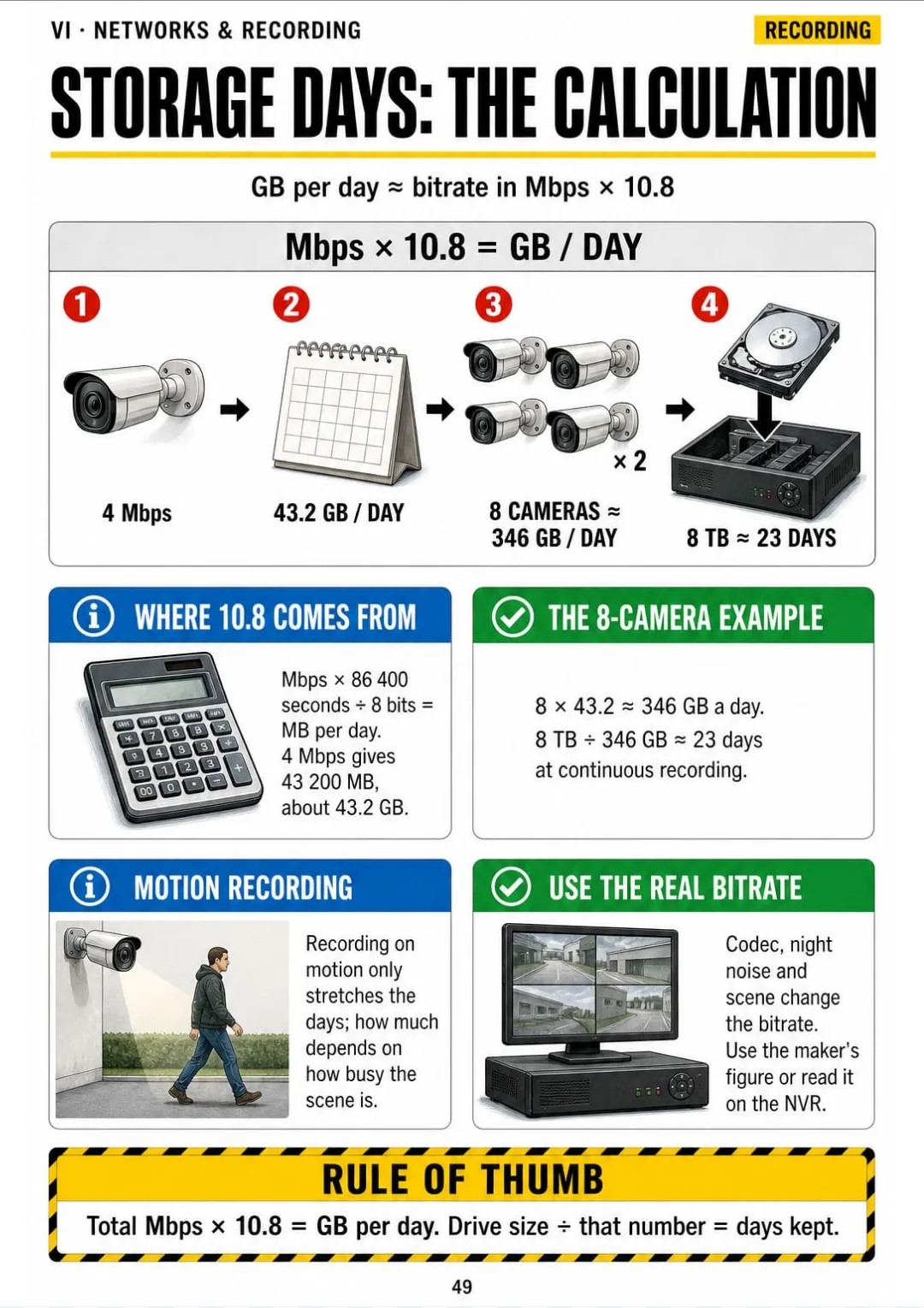
8 cameras at 4 Mbps ≈ 346 GB a day ≈ 23 days on 8 TB.
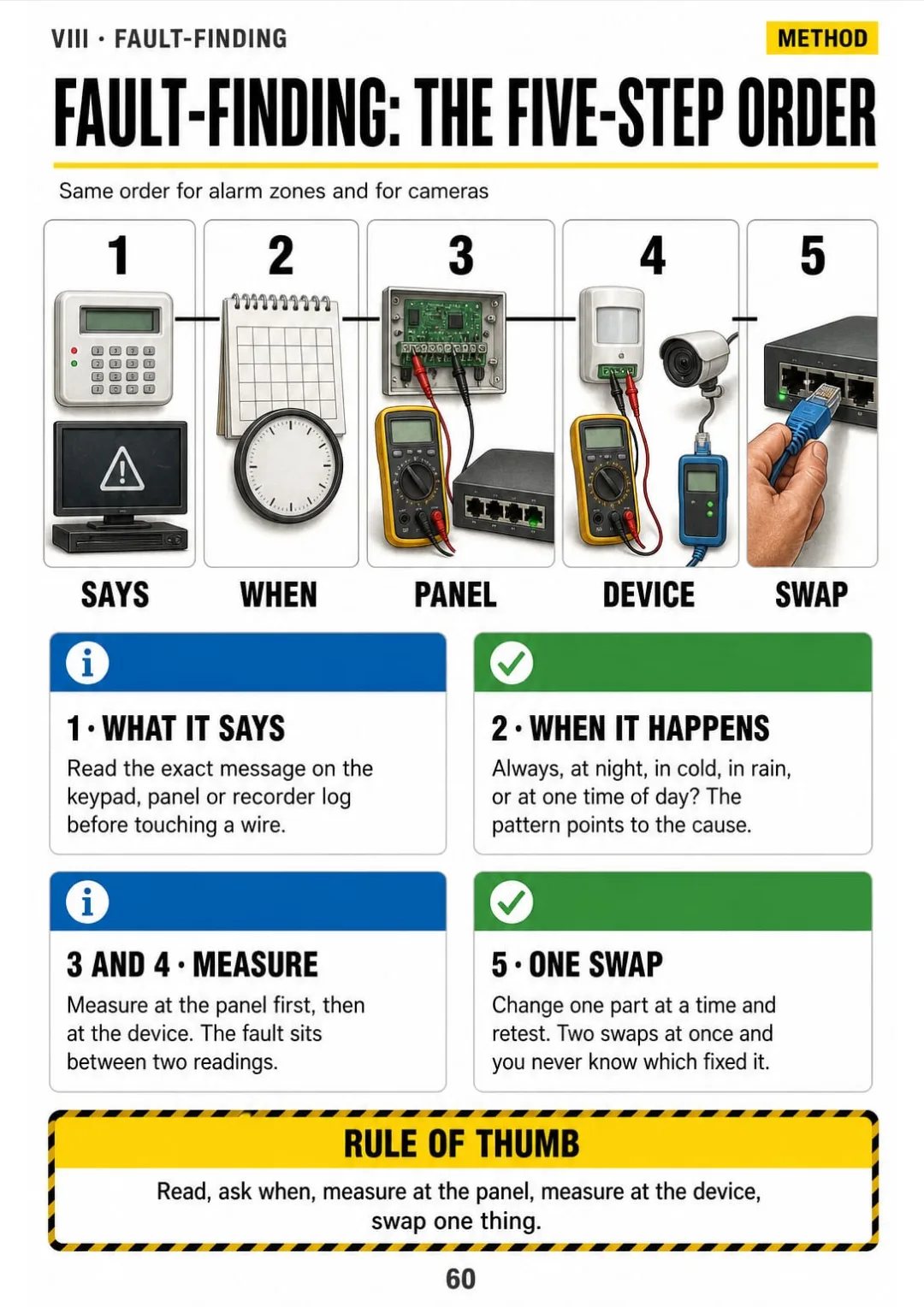
Fault-finding order: what it says → when → measure at panel → at device → swap one thing
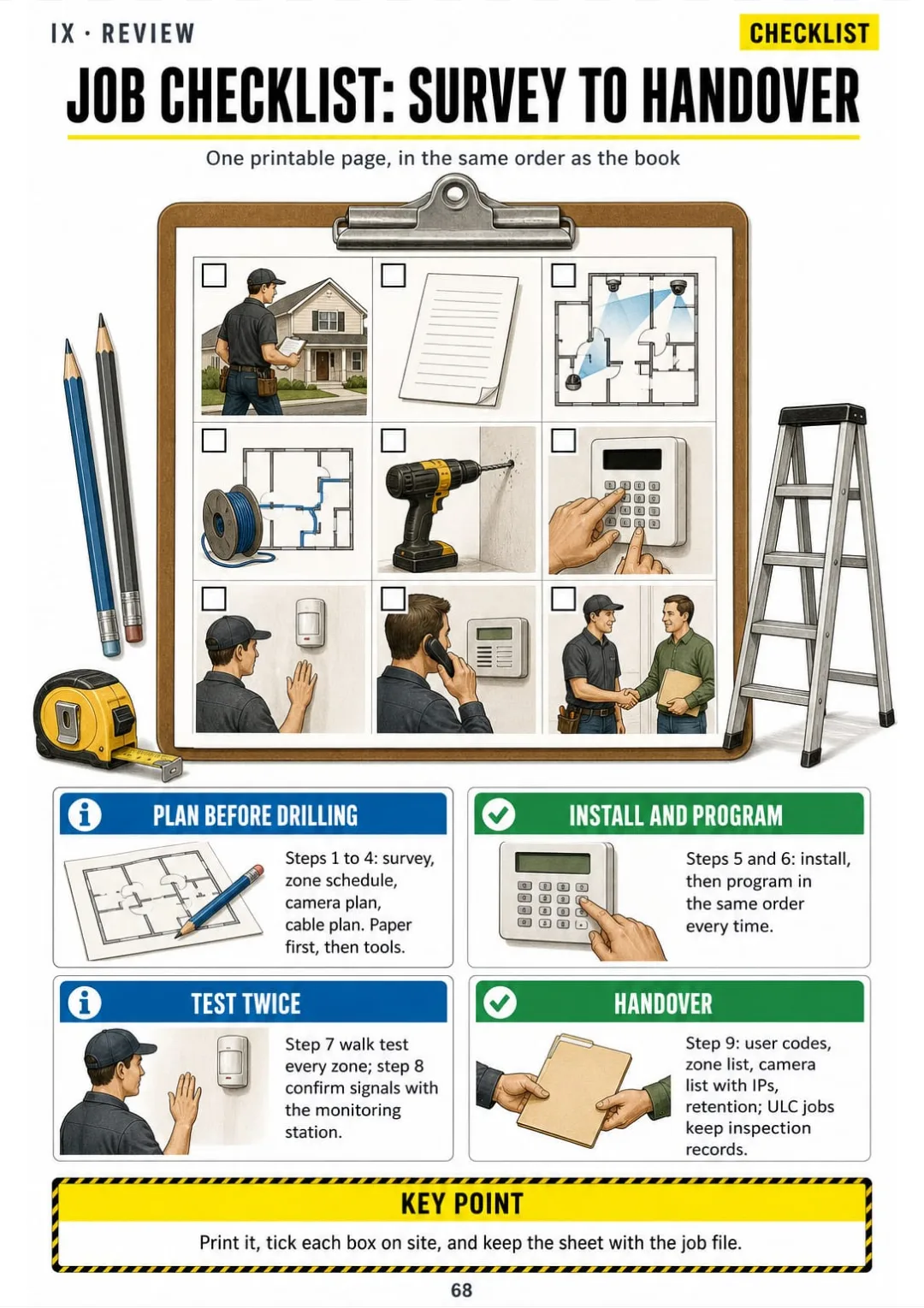
Survey, zones, cameras, cables, install, program, walk test, station test, handover
25/62.5/125/250 px/m · 100 m · PoE 15.4/30/60/90 W · Mbps × 10.8 GB a day

Swipe to see more →

These are real pages from the book. The table of contents is the full one: 9 parts and 65 topics.

The Problem Isn't You. It's How It Was Explained to You.

You're standing at the panel. Zone 6 shows trouble, the client is watching you, and the contact and the wire both look fine.

The panel manual covers end-of-line resistors in a few dense paragraphs. Single EOL, double EOL, open, short and tamper are all described in sentences, so on site you're left guessing which reading means what.

Single EOL vs double EOL: normal, open, short and tamper side by side.

In the book, end-of-line resistors get one page. Single and double EOL are drawn side by side, and normal, open, short and tamper each get their own small circuit you can read at a glance.

PIR placement, PoE power budgets, storage days, cold-weather housings and the five-step fault-finding order are done the same way: each one gets its own drawn page.

You look at the zone, you know what the reading means, and you fix it without going back to the panel manual.

COMPARE FOR YOURSELF

The Same Topic, Two Ways to Learn It

THIS
  • The manual: line after line of text
  • Detector placement explained only in words
  • You get to the job still unsure
Passive infrared detectors operate by sensing changes in infrared energy across a series of discrete detection zones generated by a segmented Fresnel lens, arranged in multiple tiers to provide long-range, intermediate and look-down coverage. Because an alarm condition is initiated when a heat source moves between adjacent zones, sensitivity is greatest for motion travelling transversely across the zone pattern and is markedly reduced for motion travelling radially toward the detector, which should be taken into account when determining detector orientation relative to anticipated intruder routes.
FOR THIS
  • The PIR pattern in one drawing
  • The aiming rule and mounting numbers in a box
  • You see it and you get it
The PIR fan pattern drawn from above: why you aim across the walking path
CONTENTS

Take a Look at the 9 Parts and 65 Topics

The system at a glance, site survey and zones, intruder detectors, panel and wiring, cameras and lenses, IP networks and recording, cold-weather installs, commissioning and fault-finding, and a final review: 69 pages, all illustrated

IThe System at a Glance · pp. 5-10
  1. An alarm system is five blocks
  2. A CCTV system is four blocks
  3. Analog, HD-over-coax or IP: which you're looking at
  4. Low voltage still has rules
  5. Who can do the work in your province
  6. Cameras and privacy: what you tell the client
IISite Survey and Zone Planning · pp. 11-17
  1. The site survey in six steps
  2. Perimeter, interior, 24-hour: three kinds of zone
  3. Entry and exit delay without false alarms
  4. Writing the zone schedule
  5. Planning a small commercial site
  6. Camera plan: what each camera has to do
  7. Cable plan and home-run routes
IIIIntruder Detectors · pp. 18-26
  1. How a PIR sees: curtains of zones
  2. PIR mounting height and position
  3. Pet-immune detectors: the weight limit is not a promise
  4. Dual-tech and ceiling detectors
  5. Door and window contacts
  6. Glass-break detectors
  7. Shock, beams and outdoor detection
  8. Keypads, sirens and strobes
  9. Wired vs wireless detectors
IVPanel, Power and Wiring · pp. 27-34
  1. Inside the control panel
  2. End-of-line resistors: why zones read normal, alarm or trouble
  3. Wiring a contact and a PIR on one page
  4. Voltage drop on long runs
  5. Battery standby calculation
  6. Bonding, separation and mains supply
  7. Communicators: phone line, cellular and IP
  8. Programming in the same order
VCCTV Cameras and Lenses · pp. 35-43
  1. Dome, bullet, turret, PTZ
  2. Lens angle and scene width
  3. Pixels per metre: detect, observe, recognize, identify
  4. Mounting height and the top-of-head problem
  5. Backlight and the glass door
  6. Night: IR range and reflection
  7. Licence plates are their own camera
  8. Mounting boxes, junction boxes and sealing
  9. Aiming and focus in five steps
VIIP Networks, PoE and Recording · pp. 44-51
  1. Cat 6 and the 100 m rule
  2. Terminating RJ45 the same way every time
  3. PoE classes and the power budget
  4. NVR, switch and router: who does what
  5. IP addresses without guessing
  6. Storage days: the calculation
  7. Codec, frame rate and bitrate settings
  8. Remote viewing and passwords
VIICold Weather and Outdoor Installs · pp. 52-56
  1. Rated operating temperature: read the bottom number
  2. Fog, frost and condensation
  3. IP66, IP67 and IK10
  4. Cable, connectors and batteries in the cold
  5. Snow, ice and outdoor detectors
VIIICommissioning, Handover and Fault-Finding · pp. 57-64
  1. Walk test in the same order
  2. Testing with the monitoring station
  3. Handover: what the client gets
  4. Fault-finding: the five-step order
  5. Zone in trouble or won't clear
  6. False alarms at three in the morning
  7. Camera offline or keeps rebooting
  8. Picture problems: blur, white-out, fog, black at night
IXReview: Checklists and Frequent Mistakes · pp. 65-69
  1. Frequent detector mistakes
  2. Frequent camera mistakes
  3. Frequent cabling and power mistakes
  4. Job checklist: survey to handover
  5. Numbers to keep in the van

One Page, One Topic, All Clear

Think of it this way:

You're doing a site survey. The client wants a camera that can actually identify whoever comes through the back door, and you need the lens and the mounting height before you quote.

You open the pixels-per-metre page and see the four levels drawn out: detect, observe, recognize, identify, with the numbers in a box and a worked example right beside them.

8 cameras at 4 Mbps ≈ 346 GB a day ≈ 23 days on 8 TB.

It's the same with zone types, PIR placement, end-of-line resistors and storage days. And with the camera that fogs up on a −30 °C night: rated operating temperature, condensation and housings each get their own page.

CCTV & Alarm Installation Illustrated is 69 illustrated pages in 9 parts, one topic per page, and it ends with checklists, frequent mistakes and the numbers to keep in the van.

What you see drawn, you don't have to memorize.

What's Inside CCTV & Alarm Installation Illustrated:

Ipp. 5-10

The System at a Glance

The alarm system as five blocks, CCTV as four, analogue vs HD-over-coax vs IP, the rules that still apply to low voltage, who can do the work in your province and what to tell the client about privacy.

IIpp. 11-17

Site Survey and Zone Planning

The site survey in six steps, perimeter, interior and 24-hour zones, entry and exit delay, the zone schedule, a small commercial site, the camera plan and home-run cable routes.

IIIpp. 18-26

Intruder Detectors

How a PIR sees, mounting height and position, pet-immune limits, dual-tech and ceiling detectors, contacts, glass-break, shock, beams, outdoor detection, keypads, sirens and wired vs wireless.

IVpp. 27-34

Panel, Power and Wiring

Inside the control panel, end-of-line resistors, wiring a contact and a PIR, voltage drop, battery standby, bonding and separation, communicators and programming in the same order.

Vpp. 35-43

CCTV Cameras and Lenses

Dome, bullet, turret and PTZ, lens angle, pixels per metre, mounting height, backlight, IR at night, licence plate cameras, boxes and sealing, aiming and focus in five steps.

VIpp. 44-51

IP Networks, PoE and Recording

Cat 6 and the 100 m rule, RJ45 termination, PoE classes and the power budget, NVR, switch and router, IP addresses, storage days, codec and bitrate, remote viewing and passwords.

VIIpp. 52-56

Cold Weather and Outdoor Installs

Rated operating temperature, fog, frost and condensation, IP66, IP67 and IK10, cable, connectors and batteries in the cold, snow, ice and outdoor detectors.

VIIIpp. 57-64

Commissioning, Handover and Fault-Finding

Walk test, testing with the monitoring station, handover, the five-step fault-finding order, zones that won't clear, false alarms at night, cameras offline and picture problems.

IXpp. 65-69

Review: Checklists and Frequent Mistakes

Frequent detector, camera, cabling and power mistakes, the job checklist from survey to handover and the numbers to keep in the van.

At the end of the book: A job checklist from survey to handover, frequent-mistake pages and the numbers to keep in the van.
Plus: 2 Free Books

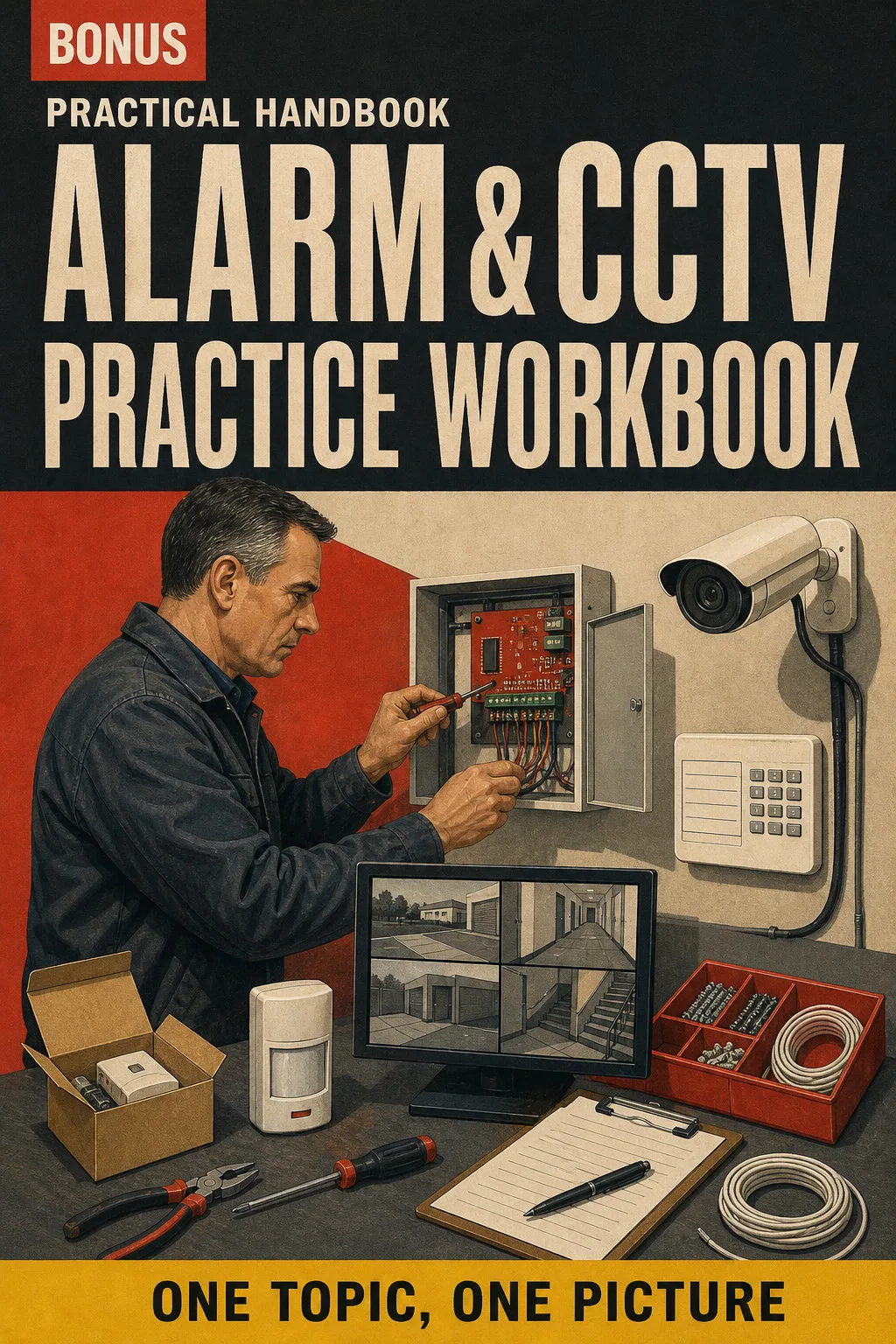
Alarm & CCTV Practice Workbook

BONUS 1: «Alarm & CCTV Practice Workbook»

Value on its own: US$ 17.90

Work through floor plans, zone schedules, lens choices and storage calculations yourself, then check every answer, so the method sticks before the next job.

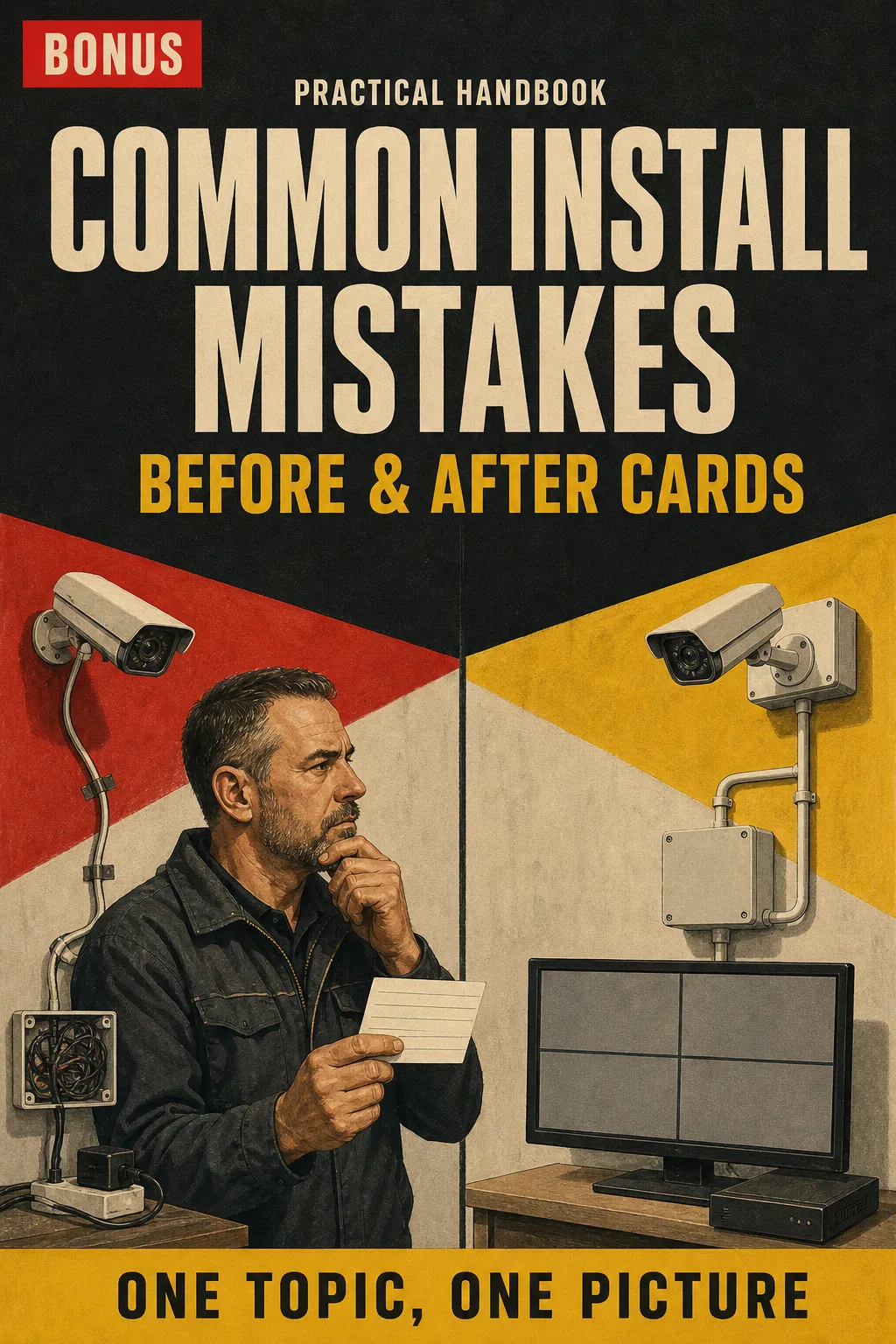
Common Install Mistakes: Before & After Cards

BONUS 2: «Common Install Mistakes: Before & After Cards»

Value on its own: US$ 14.90

Spot the detector, camera and cabling mistakes that bring you back to site, drawn side by side with the right way, on cards you can print and keep in the van.

CCTV & Alarm Installation Illustrated with 2 Free Books

  • CCTV & Alarm Installation Illustrated: 69 illustrated pagesUS$ 63
  • BONUS 1: Alarm & CCTV Practice WorkbookUS$ 17.90
  • BONUS 2: Common Install Mistakes: Before & After CardsUS$ 14.90
  • High-resolution PDF to printIncluded
Total value US$ 95.80
YOUR PRICE:
US$ 27
You save US$ 68.80
YES, I WANT CCTV & ALARM INSTALLATION ILLUSTRATED FOR US$ 27

📄 This is a digital PDF book sent to your email: nothing is printed or shipped.

Secure purchaseEncrypted payment30-day guarantee

PDF by email: We email you CCTV & Alarm Installation Illustrated as a PDF, together with the two free books. It's a single payment: no installments, no extra charges.

Who This Book Is For

You're adding alarms and CCTV to your work

You're adding alarms and CCTV to your work

You already know how to wire. The book gives you the whole security job, from zone plan to handover, drawn in the same order so you get it right the first time.

You're moving from analogue to IP cameras

You're moving from analogue to IP cameras

PoE classes, switches, IP addresses and storage days are each on their own page, with the numbers worked out, so you can size the system on site.

You run a shop and train apprentices

You run a shop and train apprentices

Your apprentices get the same drawn steps you'd show them on site, one topic per page, printed and kept in the van.

Everything You Get Today

US$ 95.80US$ 27
YES, I WANT CCTV & ALARM INSTALLATION ILLUSTRATED FOR US$ 27

📄 This is a digital PDF book sent to your email: nothing is printed or shipped.

30DAYS
GUARANTEE

30-Day Guarantee

Try CCTV & Alarm Installation Illustrated for 30 days, bonus books included.

We refund everything if the file won't open, if the book isn't what you see here, if you were charged twice or if the email doesn't arrive. Just email us.

You pay once. No subscriptions.

Frequently Asked Questions

Is it for me if I'm already an electrician and I'm just adding alarms and CCTV?

Yes. It assumes you can already wire: nobody explains what a cable is. It starts from the system as a block diagram and goes straight to zones, detectors, cameras, PoE, cold-weather installs and fault-finding. It doesn't replace your panel or camera manual. It gives you the whole job in one order, drawn, so you know what to look for in that manual and when.

Where does the content come from?

Each topic is checked against the current Canadian Electrical Code, Part I, CAN/ULC-S302 for intrusion alarm installation, inspection and testing, and manufacturer installation data. Licensing and privacy rules are summarized by province. Where a number depends on the edition or the manufacturer, the page says so, so you can confirm it on the job.

Is it official material?

No. It's an independent illustrated trade book. It names the codes and standards only to say what it is checked against.

Does it replace my training or my licence?

No. It doesn't replace trade training, apprenticeship, provincial licensing or manufacturer instructions, and it doesn't grant any licence. Licensing rules for security installers are set by your province or territory.

Are the practice exercises taken from an exam?

No. The workbook exercises are written for this book. They aren't official questions from any exam.

When and how do I get it?

As a PDF by email, sent to the address you enter at checkout. The 2 bonus books come the same way.

Do I have to pay every month?

No. It's a single payment. There's no subscription.

Can I have it on paper?

Yes. The PDF is printable, so you can print the pages you need and keep them in the van.

How does the refund work?

You have 30 days. We refund everything if the file won't open, if the book isn't what you see on this page, if you were charged twice or if the email doesn't arrive: just email us.

Before You Close This Page

No more rereading panel manuals that never stick.

End-of-line resistors: you see them drawn and you're done.

You get to the job knowing where everything is.

Drawings make studying faster.

The book is right below.

One-time payment: US$ 27 · Guarantee: 30 days · PDF by email

YES, I WANT CCTV & ALARM INSTALLATION ILLUSTRATED FOR US$ 27

📄 This is a digital PDF book sent to your email: nothing is printed or shipped.